This update brings a smoother, more reliable experience along with some exciting quality-of-life improvements. We’ve tidied up a few behind-the-scenes issues and introduced tools to help you keep your game folders clean and organized. You’ll also notice a more informative Library, early glimpses of the upcoming Downloads page, some handy new menus, plus performance boosts to keep everything running fast and responsive.
- General bug fixes including erroneously backing up game folder.
- The Nexus Mods App now detects if your game folder is not in a base state and gives you the option to clean it. (#3323)
- Downloads page placeholder: While full functionality isn't quite here yet, clicking the button in the bottom left will now open the downloads area with placeholder text. We look forward to showing you more soon.
- Library improvements: You'll now find a new Collection column showing you what collections your mod is installed into, with an icon that show if the collection is installed or in progress. (#3786)
- Kebab menus are now in place in Loadout and Installed Collections pages as well as to the Library. (#3743)
- Performance improvements. (#3761)
HOTFIX : reworked the Nexus Mods login code. Caches are invalidated sooner and in a more predictable manner. This fixes an issue where users would not see their new premium status appear after subscribing. Also fixes an issue where users would appear to lose their premium status after the app was active for a few hours.
This update contains a selection of bug fixes and quality of life improvements.
It's been the #1 most requested game to mod with the app (and rightfully so!), so we're pleased to announce that work on support for Skyrim Special Edition has begun. The road ahead is long and winding, but we've got the foundations in place now and will be building on them in future releases.
Right now, Skyrim SE will appear in the My Games section when installed from Steam or GOG Galaxy, but no other features are currently implemented.
You can now quickly select every item in the current view with Ctrl + A, alongside the existing Ctrl + Click and Shift + Click options. This makes batch installing, updating, or deleting mods faster and more convenient.
When you take actions within the app, you will start to see a subtle little "toast" message at the bottom of the screen to confirm what has just happened. Toast will fade out automatically after a few seconds to avoid cluttering the screen.
- Added a "Delete" option to the menu in the Library.
- Updated the "Apply" button to show a progress indicator rather than simply pulsing.
- Added a new dialog to better explain the benefits of downloading a collection with a Premium membership.
- Improved detection of WINE games on Linux.
- Made some progress towards better support for Linux-native games from GOG.com.
- Added support for pausing and resuming jobs (e.g. downloads) on the backend. This isn't available in the UI yet.
- Switched to a new query engine on the backend, which will increase app performance and unlock future feature work.
- Implemented a fix to avoid further "Missing Archive" errors. Unfortunately, this fix isn't retrospective, but if the affected mods are re-downloaded, it should no longer appear.
- Fixed an issue where an unintended dialog popped up for free users each time they updated a mod.
- Fixed an exception when installing SMAPI if
Stardew Valley.deps.jsoncould not be located. - Fixed an "Object Disposed" error on the Loadouts page.
- Fixed an exception in the Library caused by the background mod update check.
The following are issues that we are already aware of in this build and will address in a future release:
- Native version cannot be managed by the app.
- Epic Games version cannot be managed due to metadata issues in v2.3.
- Once a collection created by the user is removed from the app, it can no longer be edited, even if it was exported to the website.
- The game version is not checked when adding a collection, meaning you can install outdated mods without being warned.
- The table header sorting and active tab states are not saved and are reset each time the view is loaded.
- Some toast messages incorrectly appear more than once.
This update expands search to more screens, streamlines the mod update process, and includes several bug fixes for a smoother experience.
Updating mods is now faster and more predictable. By default, the app will:
- Replace the currently installed version with the new one.
- Update all editable loadouts to the latest version.
Mods used in a collection downloaded from Nexus Mods will be left untouched.
Premium members can update all eligible mods at once with the "Update All" button in the Library.
Prefer to keep the old version? Use "Update and Keep Old Version" from the Library toolbar to update without deleting the old files.
Search is now available in all mod views and the External Changes screen - making it easier than ever to find exactly what you need.
- When pushing a new revision of a collection, a list of mods that have been added and removed will be automatically generated and posted as a changelog entry.
- Exported collections now include the game version number.
- A copy of the game hashing database is included with the app by default, reducing startup times.
- Fixed the "File In Use" error for Cyberpunk 2077.
- Fixed an issue preventing the app from restarting after closing; lingering instances are now killed on startup.
- Removed erroneous error message when deleting the second-to-last editable collection.
The following are issues that we are already aware of in this build and will address in a future release:
- Native version cannot be managed by the app.
- WINE version is misidentified as native, causing some mods to fail.
- Epic Games version cannot be managed due to metadata issues in v2.3.
- Once a collection created by the user is removed from the app, it can no longer be edited, even if it was exported to the website.
- The game version is not checked when adding a collection, meaning you can install outdated mods without being warned.
- The table header sorting and active tab states are not saved and are reset each time the view is loaded.
This release adds search to the Library and enables creating collections. We also worked on adding support for the Epic Games Store version of Cyberpunk 2077; however, due to some problems with the 2.3 update, we've delayed this feature to a future release.
You can now organise your installed mods into collections in the left menu, allowing you to set up groups of mods that you can quickly toggle on or off. Simply click the new option below "My Mods" to get started.

From the Library page, you can select which Collection to add mods to. The newest collection will be the default option.

In future versions, we will enable sharing your collections on Nexus Mods and editing collections you have downloaded from the website.
Note: Uploading collections to Nexus Mods is disabled by default in this release. You can enable it in the Experimental Settings, but use it at your own risk.
One of the most requested features from community feedback was the ability to search installed mods. We've added this to the Library section and will be including it on other relevant pages in a future release.

- The app will now load the latest game version data every 30 minutes in the background.
- Added validation to app settings to prevent bad values from being saved.
- Collection metadata will now refresh each time the page is loaded in the app.
- Improve error reporting for the Nexus Mods API requests.
- Fixed a bug which prevented the app from properly recognising GOG DLCs.
- Fixed an exception that would often appear when viewing External Changes.
- Improved the error reporting around "Missing archive" errors to provide more useful information that will help fix it.
- Once a collection created by the user is removed from the app, it can no longer be edited, even if it was exported to the website.
- Exported collections do not include a valid version number.
- The game version is not checked when adding a collection, meaning you can install outdated mods without being warned.
- The sort order for some columns does not work as expected.
- The table header sorting and active tab states are not saved and are reset each time the view is loaded.
- When deleting the second-to-last editable collection, an error message will show. This can be ignored.
This release includes the ability to change your storage location, new game artwork and lots of bug fixes.
Check out the latest developer blog.
One of the most common requests we've had is to be able to change where the app stores downloaded mods. In the previous versions we had a configuration file that let users set this, but due to a bug this didn't work quite as expected.
We've given the feature an overhaul by adding a new setting option to set your storage location. This is where mods, collections, and backed up game files will be saved.

This new option is available in the Settings under "General".
Note: You must move all files to the new folder manually and restart the app to avoid issues. This step will be automated in a future release.
The spine icons and game artwork has been updated to match the new assets on the Nexus Mods website.

- Added a kebab menu to Library items including links to the changelog and mod page.
- Added the ability to toggle visibility of updates in the Library.
- Collection and Library text strings can now be localised.
- Fixed an issue which would cause the app to delete and restore the entire game on apply in certain situations.
- Fixed issues detecting changes to DLCs (e.g. Phantom Liberty, REDmod).
- Fixed an issue where the app would fail to install certain archives due to the character encoding of the internal files not being recognised.
- Fixes several issues with game detection for Heroic Games Launcher related to manifest parsing.
- Added timeouts to the background processes so the app should now close correctly after 15-20 seconds if any tasks are still running, rather than staying open indefinitely.
- If REDmod is not installed when the app needs to run it, an error is silently added to the logs instead of showing the user a pop-up.
- Fixed an error caused by the app attempting to compile REDmods but there are none installed.
- Fixed an error parsing WINE overrides on Linux for Cyberpunk 2077.
- Fixed a false positive with the "Missing packages" diagnostic for Cyberpunk 2077 on Linux caused by the app looking in the wrong location.
- When deleting a mod from the Library, the confirmation pop-up will not correctly show which collections depend on that mod.
- The sort order for some columns does not work as expected.
- The game version is not checked when adding a collection, meaning you can install outdated mods without being warned.
- The table header sorting and active tab states are not saved and are reset each time the view is loaded.
This release includes UI improvements, performance optimisations, and bug fixes.
We've had a lot of great feedback in the last few releases. Based on your most common requests we're currently looking at adding Epic Games support for Cyberpunk 2077, allowing users to set the storage location for downloads, and better searching in the Mods/Library sections for future releases. Stay tuned!
We've just completed another pass of UI improvements to make using the app even easier. Each page in the app now has a header, distinct icon and a little bit of flavour text to help you easily know which area of the app you are in and what you can do there.

The toolbars just got smarter, too! Now they are context-aware and will only show options that are relevant to the row(s) you have selected. We've paired this with a new selection indicator which shows how many mods you have selected (using Ctrl + Click or Shift + Click) and lets you quickly clear the selection.

- Reworked file trees in the app to be more performant. This includes the "View Mods Files" and "External Changes" pages.
- Added translations submitted by the community: Russian, Ukrainian, Portuguese (Brazil).
- Updated the "Missing Game" flow to try and prevent duplicate reports of missing, unsupported games.
- Added the correct headers to API requests for Nexus Mods.
- Further developed the backend systems required to create and export collections.
- Further developed the backend system to make a game-agnostic load order system.
- General performance optimisations.
- Improved the way the app registers to handle Nexus Mods downloads on Linux.
- Fixed a bug where FOMODs would incorrectly report issues with some asset paths.
- When deleting a mod from the Library, the confirmation pop-up will not correctly show which collections depend on that mod.
- Collection success ratings will sometimes not match what is shown on the website.
- The app will attempt to run the REDmod.exe even if it is not installed, resulting in an error message.
- The sort order for some columns does not work as expected.
- The game version is not checked when adding a collection, meaning you can install outdated mods without being warned.
- The table header sorting and active tab states are not saved and are reset each time the view is loaded.
This bugfix release addresses issues related to the REDmod load order which prevent it from working as intended.
- Fixed an issue where the game was not being launched with the
-moddedcommand line option, so REDmods were not being loaded. The game will now always start with this option. - Fixed an issue where the load order was not being sent to
redmod.exeafter being set due to incorrect command line arguments. - We've put in place a workaround to cater for a bug in
redmod.exewhere it will not recompile if the same mods are present as the previous run but they are in a different order. This has been reported to CD Projekt Red. - Updated the REDmod batch script used with Protontricks on Linux to support the required command line arguments.
- Fixed an issue on Linux where the REDmod load order was not being applied due to incorrect linebreaks (CRLF vs LF).
- Fixed an issue on Linux where the REDmod load order file was being posted in a location not accessible to the WINE prefix that RedMod.exe was running in.
- Cyberpunk 2077 on Epic Games is no longer detected as it's currently not supported (this change was made in 0.11.1 but was missed from the changelog).
- Collection success ratings will sometimes not match what is shown on the website.
- The app will attempt to run the REDmod.exe even if it is not installed, resulting in an error message.
- The sort order for some columns does not work as expected.
- The game version is not checked when adding a collection, meaning you can install outdated mods without being warned.
- The table header sorting and active tab states are not saved and are reset each time the view is loaded.
This release includes Cyberpunk 2077 support, a new home for load orders, and lots of bug fixes.
In this build, we're confident that we've got all the basics in place for players to mod Cyberpunk 2077 with the app. We soft launched this support in the previous version and had some great feedback from the users who tried it out - thank you!

The app offers the following features:
- Compatibility with the Steam and GOG Galaxy releases on Windows and Linux.
- Support for the most common types of mod: REDmod, archives, REDscript, and framework mods (e.g. Cyber Engine Tweaks).
- Support for collections.
- Health Check diagnostics for missing dependencies.
- Health Check diagnostics to help set up a Linux environment to mod the game.
- REDmod Load Order management and deployment.
You can read more about the available features in the documentation.
To make it easier to access your REDmod Load Order in Cyberpunk 2077, we've added a new tab to the "My Mods" and "All" sections in the left menu.

When installing mods without using collections, the "My Mods" screen will allow you manage your load order via the "Rules" tab.
When using multiple collections, the "All" section under "Installed Mods" will allow you to manage your load order via the "Rules" tab.
This tab will be expanded in future to include other load-order or file-order rules related to the mods in your loadout or collection.
- Updated the Health Check messages for Cyberpunk 2077 to match the structure of other diagnostic messages.
- When hovering the cursor to resize panels, a solid line will now appear to better indicate which panel will be adjusted.
- The app now has its own minimise, maximise and close buttons, removing the operating system "chrome" and saving more vertical space.
- The tab bar is now hidden until there are at least two tabs in a panel.
- Tabs can now be closed with a middle click.
- Added mod thumbnails to the load order page.
- Increased resilience to network errors during downloads.
- On Linux, the app will only register itself as the default Nexus Mods download handler when not installed with a package manager.
- Replaced the Stardew Valley preview UI elements with game-agnostic versions.
- Added the core backend frameworks required for the "Undo" feature.
- Added the core backend frameworks to allow the app to create and share collections.
- Improved the stability of downloads by requesting the entire file rather than using range requests.
- Use the recent rating for collections instead of "All time".
- The app will now send headers with Nexus Mods requests to allow us to better track mod manager usage.
- Games can be unmanaged via the command line (thanks to Michael-Kowata on GitHub).
- Fixed missing colours to represent added, removed, or changed files on the Preview Changes page.
- Fixed an issue where the app could end up in a state where the Apply button was not visible but the Launch button was disabled.
- Fixed an issue where the app would unnecessarily backup files during an Apply, leading to long processing times.
- Fixed a rare issue where the Apply action would not work correctly if two files have the same minimal hash.
- Fixed a crash when snapping to full screen with multiple panels open.
- Fixed "No game installed with active loadout" error that occurred when a loadout had not been applied since managing the game.
- When un-managing a game, loadouts for that game will be hidden to prevent a crash when trying to access them.
- Fixed a bug where copying a loadout could result in two loadouts with the same name.
- Fixed a bug where the app may incorrectly treat Premium users as free users if the app had been open for over an hour.
- The app will now correctly close all background processes when exiting. This was preventing the UI from re-opening and blocking users on Linux from shutting down their system without manually killing the process.
- Collection success ratings will sometimes not match what is shown on the website.
- The Epic Games release of Cyberpunk 2077 is detected but not supported.
- The app will attempt to run the REDmod.exe even if it is not installed, resulting in an error message.
- The sort order for some columns does not work as expected.
- The game version is not checked when adding a collection, meaning you can install outdated mods without being warned.
- The table header sorting and active tab states are not saved and are reset each time the view is loaded.
This release adds Cyberpunk 2077 to supported games, improves the installation of Stardew Valley mods without a manifest file and includes a draggable load order view for Cyberpunk 2077 REDmods.
In this build, we're confident that we've got all the basics in place for players to mod Cyberpunk 2077 with the app. We're looking for feedback from experienced Cyberpunk modders to ensure we've not missed anything important before we announce support to the wider community.
The app offers the following features:
- Compatibility with the Steam and GOG Galaxy releases on Windows and Linux.
- Support for the most common types of mod: REDmod, archives, REDscript, and framework mods (e.g. Cyber Engine Tweaks).
- Support for collections.
- Health Check diagnostics for missing dependencies.
- Health Check diagnostics to help set up a Linux environment to mod the game.
- REDmod Load Order management and deployment.
You can read more about the available features in the documentation.
The REDmod load order page has been updated with a fresh new look and support for re-ordering mods by dragging and dropping rows in the list. This will serve as the foundation of the load order pages we'll implement for other games in future.

- When starting the app for the first time, the welcome, data consent, and log-in messages have been combined into a single pop-up.
- Stardew Valley - We've updated the installation logic to better recognise mods that do not include a manifest file, including translations and asset replacers.
- Implemented new toolbar designs across the app.
- Added empty state for collections with no required mods.
- Reduced the size of all buttons in the UI for better use of space.
- Removed the Xbox Game Pass (Microsoft Store) experimental toggle because it is currently not functional for any game.
- The version number of the app will now be shown as 3 places, rather than 4 (e.g. 0.10.0, not 0.10.0.0).
- Installers that don't support an archive now provide a reason in the logs.
- Fixed an issue with the text alignment in the "Delete mods" pop-up.
- Fixed an issue caused by folder names with trailing whitespace characters.
- Fixed an issue where FOMODs with paths could cause the app to crash.
- Fixed an issue where the app would crash when viewing FOMOD images in a certain way.
- Fixed a bug where a collection could not be installed without applying the loadout at least once.
- Fixed an issue where the app would show an error message if the game/tool it launched returned a non-zero exit code (e.g. REDmod).
- Fixed an issue with the app would sometimes not back up game files correctly when replaced by files from mods.
- Fixed collections download pages opening inside the wrong game.
- The Epic Games release of Cyberpunk 2077 is detected but not supported.
- The app will attempt to run the REDmod.exe even if it is not installed, resulting in an error message.
- The sort order for some columns does not work as expected.
- The game version is not checked when adding a collection, meaning you can install outdated mods without being warned.
- The table header sorting and active tab states are not saved and are reset each time the view is loaded.
This is a bug-fix release that corrects an issue causing the "Update Available" pop-up to appear even when on the latest version.
- Fixed an error in the version checking logic, which resulted in the "Update Available" message appearing even when the latest version is installed.
This release includes improvements to the discovery of collection installs that are still in progress, separates mods and collections into tabs in the Library, and includes multiple UI enhancements.
Note: The "Update Available" pop-up may display incorrect instructions. On Windows, run the latest installer to update the current build. On Linux, replace the AppImage file you were using with the latest one. You do not need to uninstall the app.
To improve visibility and ease of access, collections that are not yet fully installed will now be displayed in the left-hand menu. This allows users to quickly jump back into the installation flow without having to find the item in their Library.

In testing, we found that the Library was starting to get a little cluttered with the collections and mods on the same page. Even with the collapsible sections, it was difficult to browse on smaller displays (such as the Steam Deck). To improve this, we've now separated mods and collections into tabs, as we feel most users don't need to see both at the same time.
- Files in mods from a Nexus Mods collection are now read-only to prevent users from accidentally breaking the collection by editing them.
- Mods that are required as part of a Nexus Mods collection can now only be enabled or disabled using the collection toggle.
- The toggle indicator for mods has been updated to explain better why a mod cannot be toggled when part of a collection. Clicking this indicator will now open the Installed Collection page.
- Continued to refine the UI to make it more compact.
- The "Optional" tab is now only shown for collections with optional mods.
- Improved the "Update available" pop-up to give more relevant advice depending on how the app was installed (Windows EXE, Linux AppImage, Linux Package Manager).
- Updated the Load Order page to use the newer display technologies.
- The "Advanced Install" option no longer shows a screen saying the mod is unsupported before showing the options to install files.
- The view button on the games page will now open the last applied loadout rather than the first one that was created.
- The "Login" button will no longer be disabled for a short time after clicking on it.
- If a download fails during a collection installation, subsequent downloads will no longer be aborted.
- Updated Nexus Mods links to the new format.
- Updated Privacy Policy links.
- Fixed a few instances where the app would not clean up empty directories on swapping loadouts or uninstalling.
- In the Advanced Installer, the "Suggested" folder will now correctly show a name instead of a number.
- The spine menu will now correctly show which loadout is active after the app starts up.
- Fixed an issue where some Cyberpunk 2077 mod installers (FOMODs) would not trigger correctly.
- Fixed an issue preventing mods installed by FOMOD from being deleted/disabled.
- Fixed a critical bug that would cause data to be written to the wrong file when installing or removing mods that shared some identical files.
- Fixed an error relating to "Duplicate Keys" when applying mods.
- Fixed an issue re-indexing the game files after a game update, which could result in DLCs (e.g. REDmod, Phantom Liberty) being unintentionally deleted when applying a loadout.
- Fixed an issue where large files skipped during the indexing of the game were not properly tracked by the app, causing errors when applying a loadout.
- The sort order for some columns does not work as expected.
- The game version is not checked when adding a collection, meaning you can install outdated mods without being warned.
- The table header sorting and active tab states are not saved and are reset each time the view is loaded.
This release fixes a few high-priority issues discovered during user testing of 0.8.2. Thank you for your feedback and please keep it coming.
We've included an important update for users with mods installed when first using the app. A warning will show when managing a game for the first time to make it clear that if the app is uninstalled it will clean the game folder back to an unmodded state, deleting all files that are no part of the base game. We are exploring options for a better solution, but for now, we recommend either starting with a clean game installation or backing up your mod files before using the app.

During testing, a bug was discovered where if a change was made outside the app it got added to "External Changes", however, if that file was then updated the app wouldn't save the new changes and would instead overwrite it with the original state it had imported. Now this issue is fixed, your config.json files for SMAPI mods should not get overwritten incorrectly while using the app. Big thanks to Abagaianye, madeleineostoja, and StandingPadAnimations for discovering this issue and providing detailed feedback to help us fix it.
Important: If you experience or have experienced issues with file changes being reverted, you should delete the contents of your "External Changes" page after backing up anything important in it from the game folder.
This release features an improved game version detection system, a way to manage extra files in loadouts and additional UI refinements.
We've made some major changes to how we identify the games installed on your PC in order to deliver a better modding experience. Games installed from GOG.com and Steam have been indexed and the app will match the files on your PC to those included with these releases. The app will now be able to tell if your game folder is unmodded on first managing the game and identify any mod files already in your game folder.
In future, we hope to use this system to integrate with GOG.com to allow users to quickly swap between game versions on demand.
Within your loadout, there can often be changes made to your game or mod files that aren't part of your mods. These are now collated into the new "External Changes" page shown in your loadout. Files that have been created, modified or deleted in the game folder will be listed here and allow users to manage them.
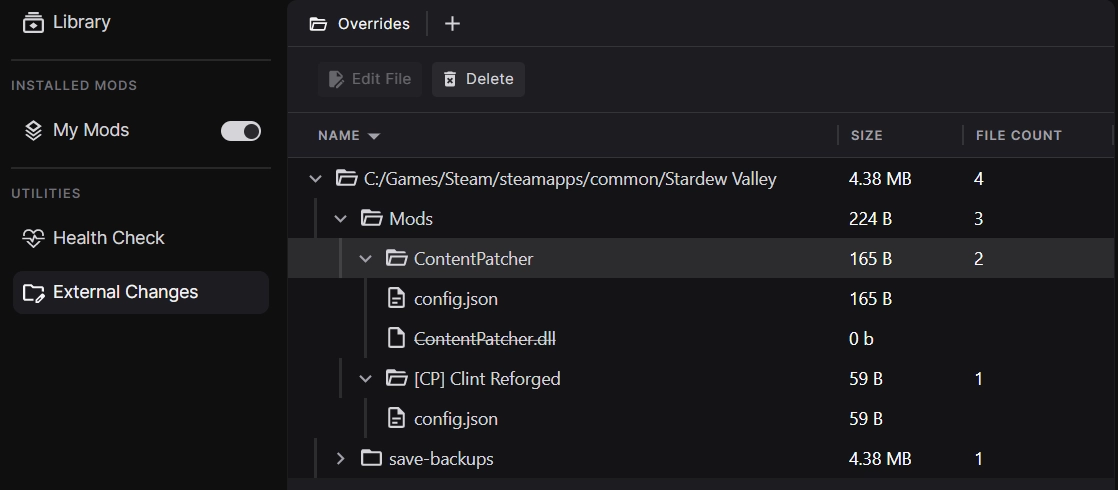
When managing your game for the very first time, any files that aren't part of the base game will be displayed here and can be quickly removed if you want to clean your game folder for a fresh start. Future development of this feature will allow you to add these files to your loadout as mods.
- Collections from Nexus Mods are now installed in a read-only state to ensure the collection is as the curator intended it. Cloning and editing collections will be added in future.
- The Collection Download page now includes an Instructions tab with both collection and mod instructions.
- Collections can now be removed from loadout without deleting them from the Library using the menu option in the header.
- The header has been redesigned to be more compact.
- The Settings UI has been updated to match the latest brand guidelines.
- Stardew Valley mods that are packaged without a top-level folder will now install correctly.
- Added more information to the Health Check diagnostics for Stardew Valley.
- All games except Stardew Valley have been moved behind the "Unsupported Games" flag in Settings. If you were modding Cyberpunk, Baldur's Gate 3 or Mount & Blade II:Bannerlord in a previous release, you will need to enable this option to continue managing your mods.
- The app can now differentiate between a mod installed as part of a collection and the same mod installed directly from the Library.
- When installing collections for Stardew Valley, any unrecognised mods are now installed relative to the "Mods" folder instead of the game folder.
- Conflicting mods within a collection are now installed in an order that respects the rules set by the curator.
- Large numbers are now displayed with comma separation or abbreviations.
- File sizes now only show decimal places above 1GB.
- Edits to mod files are now saved to External Changes instead of merging into the source mod.
- Added a new "Give Feedback" button to the bottom of the main window.
- When two different versions of the same SMAPI mod are installed into the loadout, diagnostics will use the most up to date version to display messages.
- Errors communicating with the SMAPI server will now silently be recorded in the logs rather than showing a pop up.
- Mod updates now correctly show the number of mod files with updates rather than the number of new versions between the current and latest releases.
- The left menu now displays the correct name of a collection if the internal manifest and website don't match.
- A Command Prompt window will no longer be open behind the app on Windows.
- The Success Rating for a collection now shows the correct value.
- If a collection has less than 3 votes on the Success Rating, it shows as grey instead of red.
- Collections with no required mods can now be installed.
- Fixed multiple places where the app UI would freeze when making large numbers of changes in quick succession.
- Fixed an issue where the workspace could be broken by a saved page no longer being available.
- Fixed an issue where the SMAPI version and game version comparison diagnostic was not running correctly.
- The sort order for some columns does not work as expected.
- The game version is not checked when adding a collection meaning you can install outdated mods without being warned.
- The table header sorting and collapsible section states are not saved and reset each time the view is loaded.
The release adds collections to the Library, introduces thumbnails for mods, and includes significant usability improvements for the left menu.
Important: If you are updating from 0.7.1, you will need to remove and re-add any collections to your library.
Collections are now available at the top of the Library. The new section appears once you have at least one collection installed and can be collapsed. In addition, installed collections can be easily toggled on and off from the left menu.

All collections downloaded from Nexus Mods will be in a read-only state when added to your loadout which ensures you get the full experience the curator intended. In future, users will be able to make copies of existing collections to edit them.

We've also made improvements to the experience of downloading and installing collections by adding more useful information to the Collection Download page and the Collection tiles in the library.
As an added bonus, a button will show in the UI when a collection has been updated allowing the latest revision to be downloaded - mod updates are coming soon!
We've made several improvements to the behaviour of the left menu in your Workspaces:
- The left menu has been reorganised with the Library at the top, the mods in your loadout in the middle, and the extra utilities at the bottom.
- Pages in the left menu will now show active/selected states based on which panels/tabs are open and in view.
- Tooltips have been added to the left menu items so you can always see the full name.

We've added the mod page image as a thumbnail in the Library, My Mods, and Collection Download pages. It's a small change, but we think it makes a big difference.
- Added a new error pop-up when the app encounters an unexpected error. This can be turned off in the Settings.
- Added CLI commands to allows users to delete files from the hidden Override folder where this has compromised their setup.
- Fixed Health Checks not refreshing properly when the Loadout changes.
- Fixed an issue when installing Baldur's Gate 3 Script Extender on Linux.
- On Windows, a Command Prompt window will appear behind the app while it is running.
- When viewing a read-only collection, it is still possible to toggle individual mods on and off, but this does not affect your loadout.
- Stardew Valley (Native Linux version) is not detected when installed via Heroic Launcher on Linux. The Windows version of the game can be used instead until this issue is fixed.
- Bundled mods included with collections do not appear in the UI but are still applied to your game.
- The success rating for collections does not show the correct value.
- The game version is not checked when adding a collection meaning you can install outdated mods without being warned.
- The "Switch View" option does not persist in the Library/Installed Mods view.
- The "Load Order" heading toggle does not persist in the Load Order view.
This release includes style updates for the Games, Loadouts and Health Check pages along with several important bug fixes.
We've given several of the core app pages a face lift to match our latest branding changes. This includes the Games, Loadouts, and Health Check pages. You'll start to notice more stylised icons throughout the app.

A small, but important improvement to File Conflicts has been included in this release. In previous versions, when two mods provide files with the same name, the conflict winner would be chosen at random. We didn't feel this made a lot of sense so now the mod most recently added to the loadout will always win the conflict. To adjust the priority of mods you can now remove the more important mods from the loadout and re-add them. This is a temporary solution which we work on building a UI for conflict management.
Bannerlord players can now install and manage Bannerlord Software Extender (BLSE) with the app. The game will also be started with BLSE when configured. In addition, we've added some Health Checks diagnostics which show up when:
- Bannerlord Software Extender is installed but the
BLSE.LoadingInterceptororBLSE.AssemblyResolverdependencies are missing. - Bannerlord Software Extender is installed but Harmony is missing.
On Linux, the app will now start BLSE with the /forcenetcore argument to avoid any potential issues related to the users's WINE or Proton setup.
- Free users will now see a modal prompting them to upgrade to Premium when clicking the "Download all" buttons for Collections. Downloading mods individually is still possible.
- When a loadout is removed, the associated Workspace data is now cleaned up.
- Reduced the number of log messages to make troubleshooting issues easier.
- Fixed an issue where collections that include bundled mods would never be installable as it would always show pending downloads.
- Fixed an issue where users in timezones 6 or more hours ahead of UTC would be unable to download collections.
- Stardew Valley (Native Linux version) is not detected when installed via Heroic Launcher on Linux. The Windows version of the game can be used instead until this issue is fixed.
- Bundled mods included with collections do not appear in the UI but are still applied to your game.
- The success rating for collections is not showing the correct value.
- The game version is not checked when adding a collection meaning you can install outdated mods without being warned.
- The Collections (WIP) page is not filtered by game.
- The "Switch View" option does not persist in the Library/Installed Mods view.
- The "Load Order" heading toggle does not persist in the Load Order view.
This release includes styling for the Load Order view, the ability to install and remove collections for all users and several improvements to the analytics we collect that will help inform our design decisions.
We've given the load order page for Cyberpunk 2077 REDmods a facelift and it's now much closer to the designs we're working towards.

You can re-order entries with the up and down arrows (no drag and drop yet!) and see which REDmods have been disabled in the Installed Mods view. You can also flip the load order using the table header to have the winning REDmod at the top of the list rather than the bottom.
We'd love to hear what you think of this design!
Important: Any collections you have added to the app in version 0.7.0 or earlier should be removed as they may not install properly.
The Collections experience in the app is starting to take shape! While it's still very much a work in progress, both free and Premium users can now download and install collections for all supported games.
We've also fixed up downloading off-site files for Collections. When you add these files to the library, the Collection will now automatically mark them as installed (provided you pick the exact file the curator used!).
Try it out by opening a new tab and selecting the "Collections (WIP)" page, then download a collection from the website.

In our testing the app is up to 25x faster than Vortex at installing collections (depending on your internet speed and hardware) - which is amazing!
We've made it possible to update the app without completely removing all your mods and games. You can update from 0.7.0 to 0.7.1 and keep your mods, games and other settings. This means that if you want to be an early adopter, you can keep your mod list intact as we release new versions!
- Protontricks running via Flatpak is now supported (Linux).
- The (optional) analytics we collect from within the app have been improved to give us a better idea of how you use the app, with you having to tell us directly.
- Fixed an issue counting the mods a user has installed when sending analytics.
- Added a placeholder to the Games view when no games have been detected.
- When enabling the Xbox Game Pass support option in settings, the app now correctly prompts a restart.
- Fixed an issue where the first row of the Library/Installed Mods would sometimes be misaligned with the table headers (this was part of an Avalonia update).
- Stardew Valley (Native Linux version) is not detected when installed via Heroic Launcher on Linux. The Windows version of the game can be used instead until this issue is fixed.
- When installing Collections that include bundled mods, it is not possible to fully download the collection due to a counting error. A fix for this is planned for the next release.
- Bundled mods included with collections do not appear in the UI but are still applied to your game.
- The success rating for collections is not showing the correct value.
- The game version is not checked when adding a collection meaning you can install outdated mods without being warned.
- The Library and Collections (WIP) pages are not filtered by game.
- The "Switch View" option does not persist in the Library/Installed Mods view.
- The "Load Order" heading toggle does not persist in the Load Order view.
Important: To update the app, you must completely uninstall the old version, including all mods. Why do I have to uninstall everything to update the app?
This release includes initial support for Mount & Blade II: Bannerlord, a basic implementation of REDmod load order for Cyberpunk 2077 and several UI refinements.
This version adds basic support for Bannerlord. All modules can be easily installed and managed. We've also added several advanced Health Check diagnostics to allow players to understand common issues in their setup, with more planned for the future when we add load order support!

A huge thank you to Aragas for all his help during development of this feature!
Important: While we upgrade the Collections UI, some features that worked in earlier versions will be temporarily unavailable.
We've further refined the Collections download page which unlocks the ability for non-Premium users to use the Collections feature and provides Premium users with the ability to see the list of mods included in a collection before downloading. As this page is still a work in progress, some of the UI buttons may not work as expected yet.

Users can now manage the order of REDmods installed for Cyberpunk 2077 through the new "Load Orders (WIP)" page that can be accessed from the New Tab menu.
Please note, this page is currently very basic and has not yet been styled.
- Baldur's Gate 3: Added diagnostics relating to BG3 Script Extender.
- Updated the My Games page design to better showcase the games you have managed, detected and available in the app but not detected.
- Updated the design of tabs in the Workspace system to make them more compact.
- General polish to areas of the UI such as Health Check.
- We've added a framework for data migrations which gets us a step closer to allowing users to update the app without resetting everything.
- The app has been upgraded to use .NET 9. This allows us to take advantage of the latest performance improvements and security fixes.
- Fixed an issue where the app would prompt the user to log in to Nexus Mods when starting up, even if they are already logged in.
- Users may be unable to launch Bannerlord on the Steam Deck when using Flatpak installations of Protontricks as they are currently unsupported. A fix for this is being prepared for the next release.
- The Collections feature is able to download all required files but will not install them. Mods can be manually installed from the Library but this will not import the collection configuration options. This feature will be re-implemented in the future.
- Any non-Nexus Mods file in a collection that requires the user to browse an external website can be installed into the library manually but will not be recognised as part of the collection.
- The game version is not checked when adding a collection meaning you can install outdated mods without being warned.
- Once a collection is added to the app, it cannot be removed.
- The first row of the My Mods or Library tables will sometimes be misaligned with the headers. Scrolling or adjusting any column width will correct this.
- The Library and Collections (WIP) pages are not filtered by game.
- The "Switch View" option does not persist in the Library/Installed Mods view.
Important: To update the app, you must completely uninstall the old version, including all mods. Why do I have to uninstall everything to update the app?
This release includes further improvements to Baldur's Gate 3 support, updated UI styles and lots of bug fixes.
We are continuing to add features to support modding Baldur's Gate 3. In this update, we've focused on improving the Health Check diagnostics presented to the user and begun the back-end work to provide load ordering:
- Added a Health Check diagnostic for outdated dependencies.
- Added a Health Check diagnostic for invalid PAK files.
- Improved the missing dependencies diagnostic message.
- Additional metadata is being parsed from the PAK files.
- Added support for serialising and deserialising modsettings.lsx to support load ordering in a future update.
- Collections requiring non-Nexus Mods files that can be directly downloaded are now supported.
- Added the framework for a new Collection Download page which will show which mods are installed or missing from the library.
- Standardised all "Button" components used across the app.
- Added a new "Alerts" component to the app for dismiss-able notices.
- Migrated several backend functions from Nexus Mods API v1 to v2.
- Cleared out lots of unused code related to earlier prototypes of the My Mods and Library pages.
- Starting Baldur's Gate 3 on GOG (Windows) will now open the Larian Launcher rather than defaulting to the Vulkan version of the game.
- Fixed a bug where Stardew Valley mods that used BOM characters in the manifest.json could not be read properly.
- Selecting multiple mods to delete with Shift + Click will now delete all selected mods.
- The badge next the the Library in the left menu will now properly decrease when items are deleted.
- Mods in a collection can now be correctly downloaded from hidden mod pages.
- Added missing tooltips to several buttons in the UI.
- Fixed the "Running..." text getting stuck on the Play button.
- Fixed an issue with the list-games CLI verb showing all games instead of the detected installations.
- The main window will now pop into focus when the user successfully logs in.
- Installing a collection which includes mods where the user must browse an external website to obtain the file(s) will fail with no error message. This is not supported in the current build.
- Trying to install a collection as a non-Premium user will fail with no error message. This is not supported in the current build.
- The game version is not checked when adding a collection meaning you can install outdated mods without being warned.
- Once a collection is added to the app, it cannot be removed from the left menu.
- Collections allow users to modify the included mods but do not allow you to reset them to the original state.
- The first row of the My Mods or Library tables will sometimes be misaligned with the headers. Scrolling or adjusting any column width will correct this.
- The "Switch View" option does not persist in the Library/Installed Mods view.
Important: To update the app, you must completely uninstall the old version, including all mods. Why do I have to uninstall everything to update the app?
This release adds initial support for Baldur's Gate 3, detects GOG games installed through the Heroic Launcher on Linux and further develops the Collections feature.
If you are installing the app outside of the default location (Local App Data), the uninstallers for all previous versions may not work correctly. How to manually reset your installation.
This version of the app adds Baldur's Gate 3 as the third supported game (#2122). Currently, all common mod types will be installed correctly. Installations on Steam and GOG can be detected on Windows or Linux.
The app will display a diagnostic message if a PAK file lists a dependency in the meta.lsx file that is not currently installed. We plan to improve the available data shown to the users in future releases.
The current implementation does not include load order support. You will need to go to "Mod Manager" from the main menu and enable your mods to have them take effect in the game. Load order support is planned for a future release.
Note: When launching the GOG version of the game, the app will currently default to the Vulkan version. A choice between Vulkan and DX11 will be added in a future release. If you require the DX11 version, please launch from GOG Galaxy (Windows), Heroic Launcher (Linux) or via bg3_dx11.exe.
Linux users can now manage GOG games installed or imported using the Heroic Launcher (#2103). Due to technical limitations, we've disabled REDmod deployment for Cyberpunk 2077 using Heroic, but it's possible to have the launcher run this process when starting the game. Automated deployment for REDmods in Heroic.
Important: Collections support is still an experimental feature and may not work as expected. Please check the Known Issues section if you choose to install a collection.
In this build, we've made further updates to the process of downloading and installing collections. The feature does not have parity with Vortex yet so cannot be used to install a collection fully.

The changes we've made include:
- Updated the card design for collections (Above).
- Added support for FOMOD presets and binary patching during installation.
We're starting work on showing when a mod has an update in the app. The backend to enable this feature is mostly complete and we will be adding the UI elements to support it in an upcoming release.
- Most collection installations will not complete successfully. This is due to several features that have not yet been implemented.
- The game version is not checked when adding a collection meaning you can install outdated mods without being warned.
- Trying to install a collection with an unsupported type of mod (e.g. non-Nexus Mods files) will fail with no error message. This is not supported in the current build.
- Trying to install a collection as a non-Premium user will fail with no error message. This is not supported in the current build.
- Once a collection is added to the app, it cannot be removed from the left menu.
- Collections allow users to modify the included mods but do not allow you to reset them to the original state.
- The first row of the My Mods or Library tables will sometimes be misaligned with the headers. Scrolling or adjusting any column width will correct this.
- The "Switch View" option does not persist in the Library/Installed Mods view.
- The app will now uninstall correctly when installed outside of the default directory on Windows.
- The correct WINE prefix will now be used for games on Linux.
- When the numerical badges in the left menu show 3 or more digits, the width of the badge will expand correctly.
- Fixed an issue where batch actions would not work correctly when adding/removing/deleting mods from the Library or Loadout pages.
- The app will no longer re-download the user's avatar image every time a request is made to the Nexus Mods API.
Important: To update the app, you must completely uninstall the old version, including all mods. Why do I have to uninstall everything to update the app?
This release adds a very basic implementation of downloading Collections, updates the UI to the new tree view and includes some enhancements when interacting with Windows applications via Linux.
The My Mods and Library pages have been completely reworked to use the new tree view. Mods are now grouped by the mod page on Nexus Mods, meaning if download several files from the same page they will be grouped together. A "Switch View" option has been added to the toolbar to toggle these groupings on or off. We are continuing to work towards to designs shown in the previous changelog.

Important: The feature is unfinished and not considered stable. It will not accurately install complex collections and is currently only functional for Premium users.
We've included a very early implementation of the Collections feature in this release. It's incomplete and will not install collections as the user has set them up in Vortex. Currently, only mods from Nexus Mods can be installed - anything from external websites or bundled with the collection will not install as expected.

Collections will appear as a separate list of mods in the left menu. Users can view all mods in the loadout from the new "Installed Mods" option at the top of the left menu.
To start out, this will only be available to Premium users, but we are working on the free user journey separately which requires considerably more UI elements to be created. This will be available in a future release.
As a further enhancement to support for Cyberpunk 2077, we will now detect if the REDmod DLC is missing and prompt the user to install it if required.

We've also fixed the issue which prevented REDmod from deploying automatically on Linux. This work also sets up a framework for running Windows apps and tools on a Linux system using Protontricks (#1989).
- When batch selecting mods in My Mods and using the remove button the app will occasionally fail to remove mods that are not currently visible in the UI due to scrolling.
- Trying to install a collection with an unsupported type of mod (e.g. Bundled or External) will fail with no error message. This is not supported in the current build.
- Trying to install a collection as a non-Premium user will fail with no error message. This is not supported in the current build.
- Once a collection is added to the app, it cannot be removed from the left menu.
- Collections allow users to modify the included mods but do not allow you to reset them to a the original state.
- The first row of the My Mods or Library tables will sometimes be misaligned with the headers. Scrolling or adjusting any column width will correct this.
- The "Switch View" option does not persist.
- The name of the active loadout will now appear in the top bar (#1953).
- The app now has a minimum window size of
360x360to prevent it being resized to unusable dimensions (#1947).
- Stardew Valley: Fixed enabled mods showing up as disabled in the diagnostics (#1923).
- Linux: Fixed the game not launching when running through Steam (#1917).
- Added a system for storing and displaying images in the app.
Important: To update the app, you must completely uninstall the old version, including all mods. Why do I have to uninstall everything to update the app?
This release enhances support for Cyberpunk 2077, adds multiple Loadouts per game and implements the back-end changes to support our new "Loadout items" data model.
This version further refines the modding experience for Cyberpunk 2077 players by adding additional diagnostics to the Health Check and automatically running REDmod - if necessary - before starting the game. Cyberpunk 2077 Features.
Note: It is not currently possible for the app to run REDmod automatically on Linux - Windows users are unaffected. If you are using REDmods on Linux, you may need to manually run the REDmod.exe file located at tools\redmod\bin\redmod.exe before launching the game.
Loadouts offer a convenient way to have manage several different mod setups for a single game. Players can easily swap between simple or complex mod setups by creating multiple loadouts. In this release players can create, copy and delete loadouts for any supported game. You can learn more about loadouts here.

Your mod configuration files for Stardew Valley are synced to the current loadout, so you can have different mod settings for different lists of mods.
We're still working on the new "tree view" for the My Mods and Library pages, but you can preview them in this version by enabling the "Enable tree UI for Library and My Mods" toggle in the app settings. The image below is the current design we are working towards and does not represent what is available in the app.

Please be aware that these pages are unfinished and are not stable enough to fully replace the current views, but we are working hard on improving them and hope to start using them in the next release.
- The Downloads page is not working and currently shows a placeholder progress bar.
- Cyberpunk 2077 - REDmods are not automatically deployed on Linux.
- Updated the My Games page with new tile designs.
- Game tiles now show a store icon to indicate where the game was downloaded from.
- It is now possible to delete mods from your Library.
- Within a Workspace the active panel is now highlighted in the UI.
- All panels and tabs in Workspace now have a history, allowing the user to navigate forward or backward using the new arrows on the top toolbar.
- The fonts used in the UI have been updated to Inter in line with our new design system.
- Fixed the game icon in the spine flickering when updating a loadout.
- Reworded the "Update available" pop-up to make it more clear that updating the app requires a full reset of your mod setup.
- Fixed an issue where Steam games would fail to launch on Ubuntu.
- Downloading files now uses a new "Jobs" system to make them easier to manage.
- We are continuing our backend work to convert from "Mods" to "Loadout items". Forum Post: What even is a "mod" anyway?
- The synchronizer for handling loadout states has been reworked to provide much more robust coverage of edge cases.
- Added generic support for path-based diagnostic checks when checking for missing dependencies.
- @Patriot99: Polish translation updates.
This release makes some refinements to the Stardew Valley modding experience based on user feedback, improves various UI elements and includes a number of back-end bugfixes.
- Fixed the "SMAPI is disabled"-diagnostic for multiple SMAPI installations (#1674).
- Fixed Loadout disappearing when applying (#1737).
- Fixed un-managing a game removing all Loadouts instead of just the ones for the current game (#1738).
- Fixed sorting in the Mod Library and the "Completed Downloads"-section (#1690).
- Fixed SVGs not loading and rendering properly in the markdown viewer (#1661).
- Fixed SVGs throughout the App (#1622, #1681).
- Fixed not disposing services on close correctly (#1679).
- Windows: Fixed log file creation failing due to illegal character in path (#1728). Thanks, @ZeeWanderer!
- Linux: Fixed protocol registration (#1691, #1689, #1683).
- Linux: Upgraded GameFinder to fix an issue with not being able to find Steam installed as a Flatpak or Snap (#1720).
This version of the app adds Cyberpunk 2077 to the Games section (#1719). We are now actively working on supporting this game but the implementation is still very experimental and may not work for all types of mod. Further improvements are planned for future updates.
- Added support for ignoring game assets when backing up the game files. For Cyberpunk 2077, this can result in 98.75% less disk space used: 1 GB instead of 80 GB (#1713).
- The logs directory can be opened from the help menu in the top bar (#1675).
- Improved user documentation for Workspaces, Health Checks and Stardew Valley.
- Reworked protocol registration to set the App as the default on startup (#1691).
- Reworked out data model to use our new source generator (#1626).
- Reworked out synchronizer to a simpler 3-way merge approach. (#1707).
- Began working on adding Loadout Items, Library Items, and reworking Downloads (#1336).
- This release contains some major changes for package maintainers. See the new docs for details.
This is a minor release containing many UI improvement and bugfixes. To illustrate all of these changes, here are before and after screenshots of version 0.5.1 and 0.5.2:


Notably is the redesign of the Spine buttons (#1539), the rework of the TopBar (#1580, #1621), and the many improvements to the Settings page including a redesign of the toggle switches (#1549), the combo boxes (#1549), and the addition of sections (#1618). The settings page will continue to evolve over time, but this is already a big step forward.
We've added a banner to the new tab-page to better promote the panel system. You can dismiss the banner manually, or it will be dismissed automatically, if you add a new panel (#1584, #1595):

- Improved the Mod Library design and usability. Mods can now be added from the library and the installation status will switch if the mod has already been installed (#1543).
- New messages have been added to the Mod Library and the Mods page when they are empty (#1617).
- Xbox Game Pass has been disabled until we find a solution to deal with protected Xbox Store binaries. See #1476 and #1477 for details.
- Missing dependency diagnostic for SMAPI Mods will now show the mod name (#1650).
- Changed the default open page behavior for the settings page to always open in the "Home" workspace as a new panel (#1598).
- After logging in via Nexus Mods, the App window will move to the foreground to signal completion of the login process (#1544).
- The line in the download speed graph will automatically be hidden after 5 seconds of inactivity (#1597).
- Both the diff and mod file tree will auto-expand the root nodes for better usability (#1593).
- Renamed "Diagnostics" to "Health Check" (#1586).
- New documentation has been created for both users and developers (#1624).
- The updated documentation also includes a new section for package maintainers. Thanks to @l0b0, @MattSturgeon and Abzie we have the first packages appearing for both NixOS and Arch:

- Linux: Fixed the Launch button. Steam and the Game will now start correctly (#1533 and #1151).
- ToolTip styles have finally been fixed and should appear correctly (#1566, #1592).
- Fixed an issue where broken data can result in having no panels (#1599, #1526).
This is a minor release containing bugfixes and small UI improvements.
- Fixed link in the metrics opt-in overlay (#1523, #1524).
- Fixed the infinite loading screen when previewing apply changes (#1502).
- Fixed the uninstaller (#1503, #1504).
- Fixed a silent exception when using an uninitialized value (#1493).
- Various UI fixes and improvements (#1495, #1517).
This release is packed with new features. Configs generated by the game are now ingested into the correct mod, and can be edited using our new Text Editor (#1358, #1346):

The text editor uses AvaloniaEdit and comes with syntax highlighting and many features you'd expect a code editor to have. You can even change the theme in the toolbar directly or using our new Settings UI (#396, #920):

Settings have been in the works for a long time, and we've finally developed a system to easily create settings and allow users to change them. The UI will be expanded with sections, a search bar, and many more features in the future.
Our Downloads Page received a lot of attention in this release as well. It now contains a very nice and sleek download speed chart, and a list of completed downloads (#1297, #1397):

Clicking the "View in library" button will take you to our new Mods Library. Here you can see a list of all mods you've downloaded and installed. You can also quickly add a mod to your Loadout (#1268, #1347):

The biggest change we've done is completely overhauling our internal data model and moving almost everything to our custom build database called MnemonicDB. The immediate benefit of this change is better faster, the long term benefit is having a reliable database with migrations and opportunities for new and awesome features without being bogged down by our previous data model.
One notable change that the new data model brought to the App is reified deletes.
- Starting the App for the first time will open a warning about the state of the release. This overlay can be opened again by clicking the help icon in the top bar (#1390).
- Navigating panels has been made easier. You can now right-click buttons that would create panels, to open up a context menu. Similar to browsers, combinations like Ctrl+Click or Shift+Click also work (#1266).
- This Changelog can now be viewed directly in the App (#1258).
- Stardew Valley saves are no longer managed by the App (#1344).
- Added new Stardew Valley diagnostics:
- Stardew Valley has a new image (#1393).
- The "Library" and "Diagnostics" entry on the left menu now show badges with counts for new archives and active diagnostics (#1452).
- Added a message to an empty Loadout (#1464).
- Updated mod names for failed installations (#1468).
- Game Files and the Override Mod are hidden by default, this is controlled using a setting (#1286, #1341).
- Restrict release build to only having one Loadout (#1416).
- Restrict release build to only show Stardew Valley (#1401).
- The CLI and how we handle multiple processes has been reworked (#1345).
- Logging to the console can be now enabled in the settings, it's disabled by default (#1351).
- A console window will no longer appear on Windows when starting the App (#1410).
- Package maintainers can choose to disable the bundled 7z binary (#1308).
- Loadouts can be removed and games can be un-managed (#1259, #1279).
- Added an uninstaller (#1383).
- Tons of UI fixes and small visual improvements.
- The login overlay has been fixed and will now appear correctly again (#1402).
- Telemetry has been reworked and fixed (#1293).
v0.4.1 - 2024-04-17
The highlight of this PR is the new Apply Diff View (#1202). You can now preview the changes made to disk before applying the Loadout:

Stardew Valley received three new diagnostics (#1171, #1168). These diagnostics use the current game version and a compatibility matrix to figure out if the currently installed SMAPI version is compatible:


This also includes our first "suggestion" diagnostic. This diagnostic will only appear if you have no mods installed, and it will recommend a supported SMAPI version:

- A new settings backend was added in preparation for a settings UI. See #1182 for more details.
- The App will now use two logging files,
nexusmods.app.main.logandnexusmods.app.slim.log, instead of onenexusmods.app.logto prevent log collisions between processes (#1167). - The default logging level has been changed from
InformationtoDebugfor Release builds to make it easier to debug issues (#1209).
- Fixed icons clipping in the left menu (#1165, #1169).
- Windows: Fixed Stardew Valley not launching with a console (#1135, #1205).
- Linux: Fixed NXM protocol registration when using an AppImage (#1149, #1150).
- Linux: Fixed whitespace in desktop entry files (#1150, #1152).
- Linux: Fixed various issues related to launching the game through Steam (#1206, #1151).
This is the end of the CHANGELOG. All previous releases used an auto-generated changelog in the GitHub release.