
This package provides Aspire as a Resource in the Aspire Host Dashboard , making it easier to test and manage Aspire dashboards. You can download the solution at https://github.com/ignatandrei/aspireExtensions/tree/main/src/AspireResourceExtensions in order to see the tests
- Adds Aspire dashboard as a resource for testings
- Exposes login and base URLs as environment variables
- Exposes Resources as Mermaid graph
- Exposes Resources as CSV
- Exposes Resources as Swagger API
( see Examples below )
Install via NuGet:
dotnet add package AspireExtensionsResource
- Add the Aspire resource to your distributed application builder:
using AspireResourceExtensionsAspire;

var aspire = builder.AddAspireResource();- Use the resource to add environment variables to other resources:
aspire.Resource.AddEnvironmentVariablesTo(otherResource);( see below integration with Playwright tests for .NET and NodeJS )
- Start parsing Aspire dashboard URLs:
Instead of
builder.Build().Run();write this:
var app = builder.Build();
var result = aspire!.Resource.StartParsing(app,builder);
await Task.WhenAll(app.RunAsync(), result);Go to the Aspire Resource URL at /BlocklyAutomation to start or stop services.
Suppose that you have a NodeJS playwright app that you want to test your ASPIRE dashboard. You can integrate this way : In AppHost.cs
var npmTests = builder.AddNpmApp("GenerateVideo", "../GenerateTest")
    .WaitFor(aspire)
    .WithExplicitStart()
    ;

aspire.Resource.AddEnvironmentVariablesTo(tests,npmTests);
In the test you can write
const DEFAULT_BASE_URL = process.env.ASPIRE_BASE_URL ??"";
const DEFAULT_LOGIN_URL = process.env.ASPIRE_LOGIN_URL??"";
const RESOURCE_URL = `${DEFAULT_BASE_URL}`;

test.describe('Test group', () => {
  test.use({ ignoreHTTPSErrors: true });

  test.beforeEach(async ({ page }) => {
    await page.goto(DEFAULT_LOGIN_URL);
    await page.waitForLoadState('networkidle');

});Suppose that you have a NodeJS playwright app that you want to test your ASPIRE dashboard. You can integrate this way:
In AppHost.cs
var tests= builder.AddTestProject<Projects.AspireResourceExtensions_Tests>("MyTests",
    "test --filter Category=Integration"
    )
    .WaitFor(aspire)
    .WithExplicitStart()
    ;
aspire.Resource.AddEnvironmentVariablesTo(tests);
In the Playwright test you will obtain the ASPIRE Dashboard url:
private (string ASPIRE_LOGIN_URL, string ASPIRE_BASE_URL) Endpoints = (
    Environment.GetEnvironmentVariable("ASPIRE_LOGIN_URL") ?? throw new ArgumentException("Should run from aspire")
    ,
    Environment.GetEnvironmentVariable("ASPIRE_BASE_URL") ?? throw new ArgumentException("Should run from aspire")
);Test code to obtain the screenshot of aspire
    var (loginUrl, baseUrl) = Endpoints; //see above definition of Endpoints
    playwright = await Playwright.CreateAsync();
    browser = await playwright.Chromium.LaunchAsync(new BrowserTypeLaunchOptions { Headless = false });
    page = await browser.NewPageAsync();
    await page.GotoAsync(loginUrl);
    await page.WaitForLoadStateAsync(LoadState.NetworkIdle);
    await page.GotoAsync(baseUrl);
    await page.WaitForLoadStateAsync(LoadState.NetworkIdle);
    await page.GetByRole(AriaRole.Tab,new() { Name = "Graph" ,Exact=false} ).ClickAsync();
    await Task.Delay(5000);
    await page.GetByRole(AriaRole.Button, new() { Name = "Zoom Out", Exact = false }).ClickAsync();
    await Task.Delay(5000);
    await page.ScreenshotAsync(new PageScreenshotOptions { Path = "AspireResourceGraph.png" });

}
This is the result
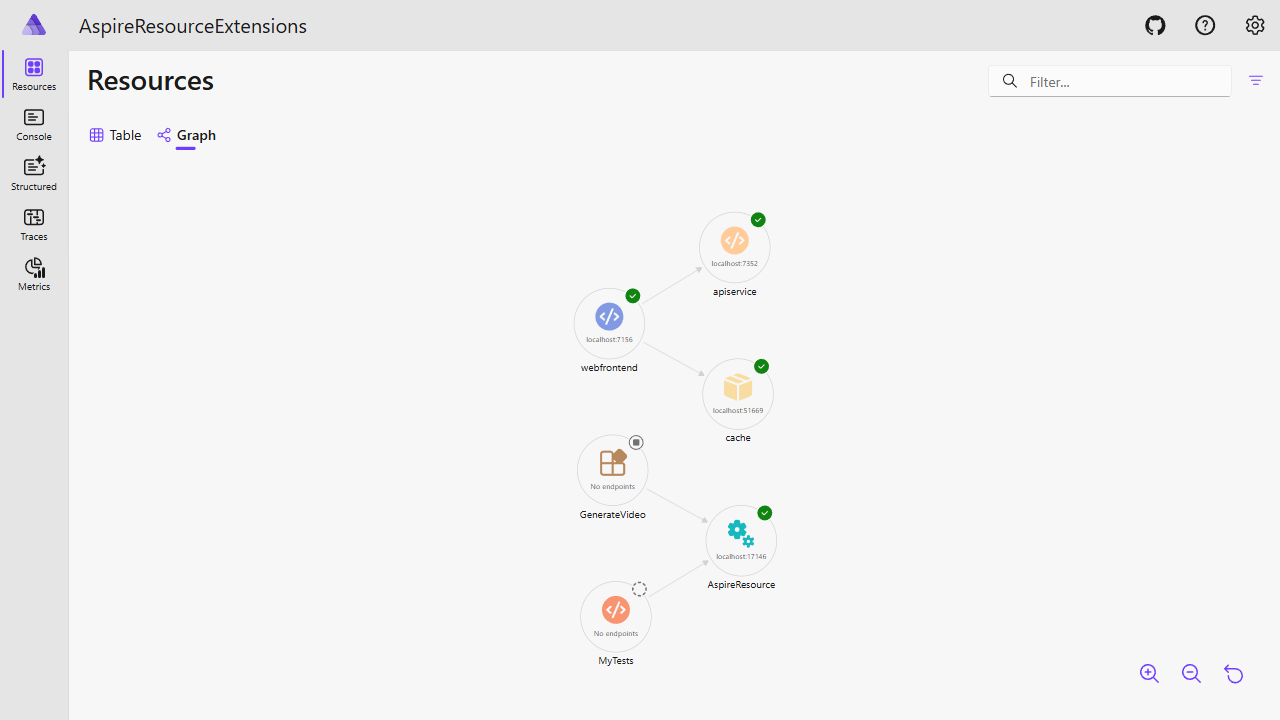
const actionsButton = page.getByRole('button', { name: 'Actions' }).nth(1);
    await flashAndClick(actionsButton);
    await flashAndClick(page.getByRole('menuitem', { name: 'View details' }));
    const urlTables = page.locator('table');
    await expect(urlTables).toHaveCount(7);

    const urlTable = urlTables.nth(2); // Assuming the URLs table is the second table on the page
    urlTable.scrollIntoViewIfNeeded();
    await flashAndClick(urlTable);
    const rows = urlTable.locator('tbody tr');
    await expect(rows).toHaveCount(2);

    // First row assertions
    const firstRow = rows.nth(0);
    await expect(firstRow.locator('a', { hasText: `${DEFAULT_BASE_URL}` })).toBeVisible();
    await expect(firstRow).toContainText('BaseUrl');
    await expect(firstRow).toContainText('ASPIRE_BASE_URL');
    await firstRow.highlight();
    // Second row assertions
    const secondRow = rows.nth(1);
    await expect(secondRow.locator('a', { hasText: `${DEFAULT_LOGIN_URL}` })).toBeVisible();
    await expect(secondRow).toContainText('LoginUrl');
    await expect(secondRow).toContainText('ASPIRE_LOGIN_URL');
    await secondRow.highlight();
And this is the video generated
https://ignatandrei.github.io/aspireExtensions/images/AspireResourceExtensions/ShowUrl.gif

You can browse to http://localhost:(aspirePort+1)/mermaid.html to see the mermaid graph of the Aspire resources.
See the video generated
https://ignatandrei.github.io/aspireExtensions/images/AspireResourceExtensions/Mermaid.mp4

You can browse to http://localhost:(aspirePort+1)/openapi/v1/swagger to see the swagger API of the Aspire resources. See the video generated
https://ignatandrei.github.io/aspireExtensions/images/AspireResourceExtensions/Swagger.mp4

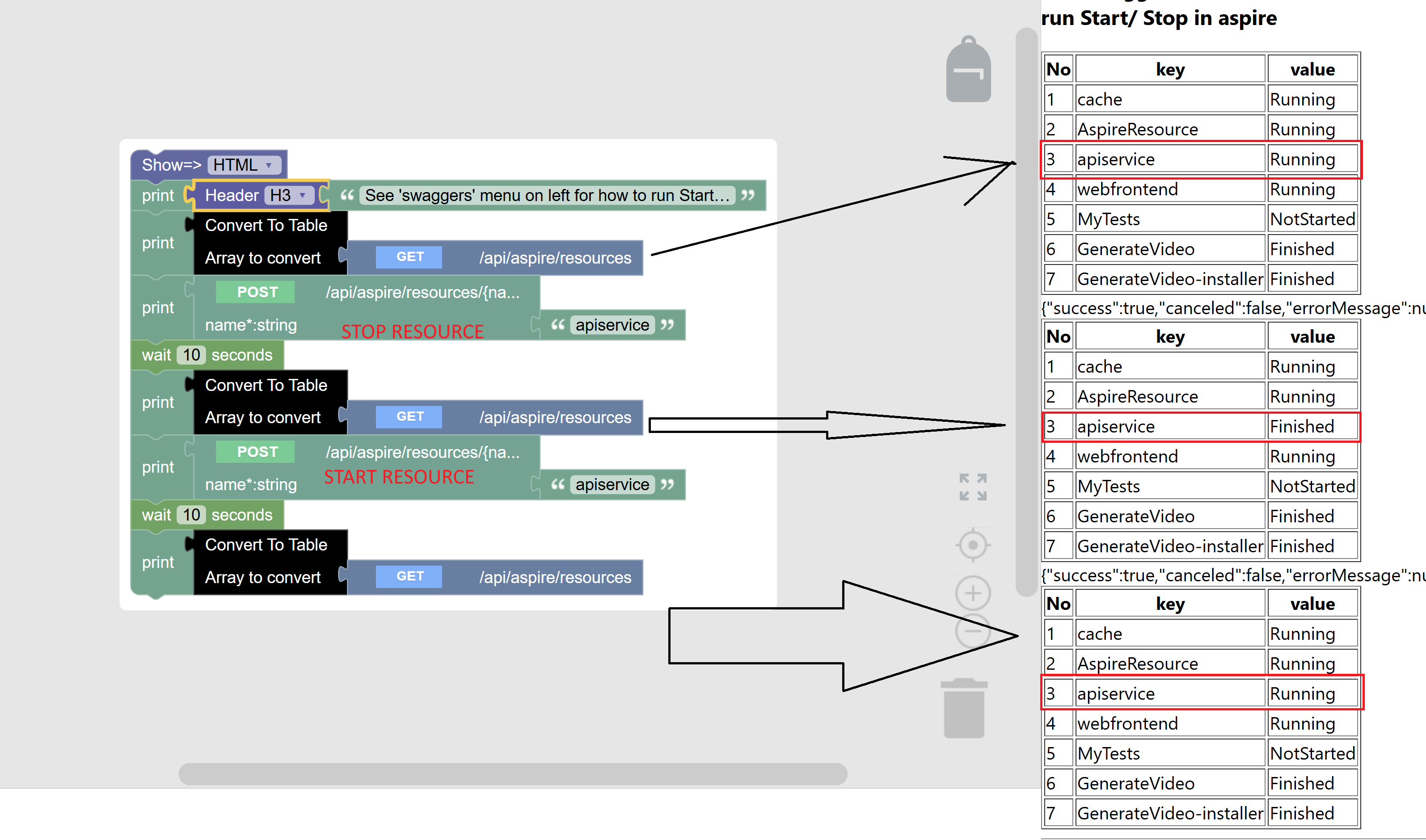
Exposing start / stop of resources as swaggers
This project is licensed under the MIT License. See LICENSE for details.