The flow contains custom functions and special features. The purpose of each one is described here:

This function allows you to set dynamic pump speeds, depending on the current operation. The reason you might want to do this, is that the piping length and diameter between the two water circuits are completely different and require a different optimal flow.
Set a different maximum water flow during DHW operation.
Set a different maximum water flow during HEAT operation.
You can set a default (low) maximum water flow. This is active when both operations are inactive (with active compressor).
Note
Do not set the maximum flow too low. It causes erratic behavior and a LOT of stop/starts.
Do not set the maximum flow too high. It causes the pump to stay longer on high compressor frequencies
Important
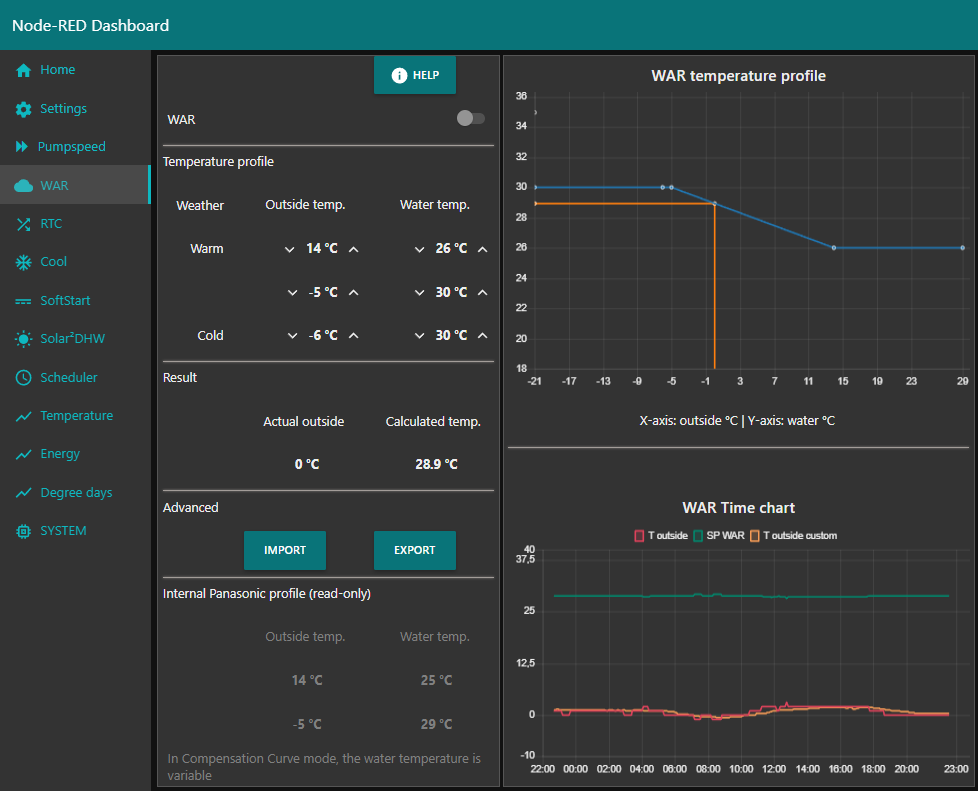
This function is only available when the heat pump is set to "Direct" mode. When the heat pump is set to "Compensation Curve" mode, the WAR function is automatically greyed out and disabled.
Question: Why have you created the same custom function while Panasonic provided the same function as "Compensation Curve"?
Answer: The native Panasonic implementation is limited to the in-built thermocouple or connected external temperature sensor. Both are affected by direct sunlight and show incorrect values then. The custom function is able to use any sensor which is able to produce values into Node Red. Personally I use "OpenWeatherMap" as a source. But any local sensor can be used.
You can import / export settings to the Panasonic heat pump.

This function adjusts the setpoint of the water depending on the room temperature.
When the temperature in a room gets too high, it will add "-1" to the current setpoint of the water temperature or shift.
You can set the room target temperature, the temperature limits and you can set the correction to be performed.
Additionally it is possibility to use automation's. To have the pump shut down when above a trigger temperature and turn back ON again below a revert temperature.

Default behavior of the heat pump is when it starts up the compressor will go to high Hz for a period. Only when the returning water temperature approaches the setpoint, it ramps down the Hz and become more economic.
If the SoftStart function is enabled and the compressor starts, the water setpoint will be lowered. This should cause the compressor to ramp down quicker, within minutes. When ramp down of the compressor frequency has occurred, the HEAT setpoint restrictions will gradually be lifted.
There's an add-on to the SoftStart called SoftStart-Quietmode
This is an extra (add-on) function to reduce the compressor frequency at startup even more.
Some heat pump models will start a run and always go up to 45 Hz in de first minute(s) regardless of the target temperature.
This Quietmode (when switched on) will put the heat pump in the Quietmode (level 3) at rest and waits till the run starts.
When the compressor turns on, the Quietmode will remain active for an amount of time and after this time switches back to the previous Quietmode (if set).
You can specify this fallback time in the Setup - Quietmode time (default 5 min).
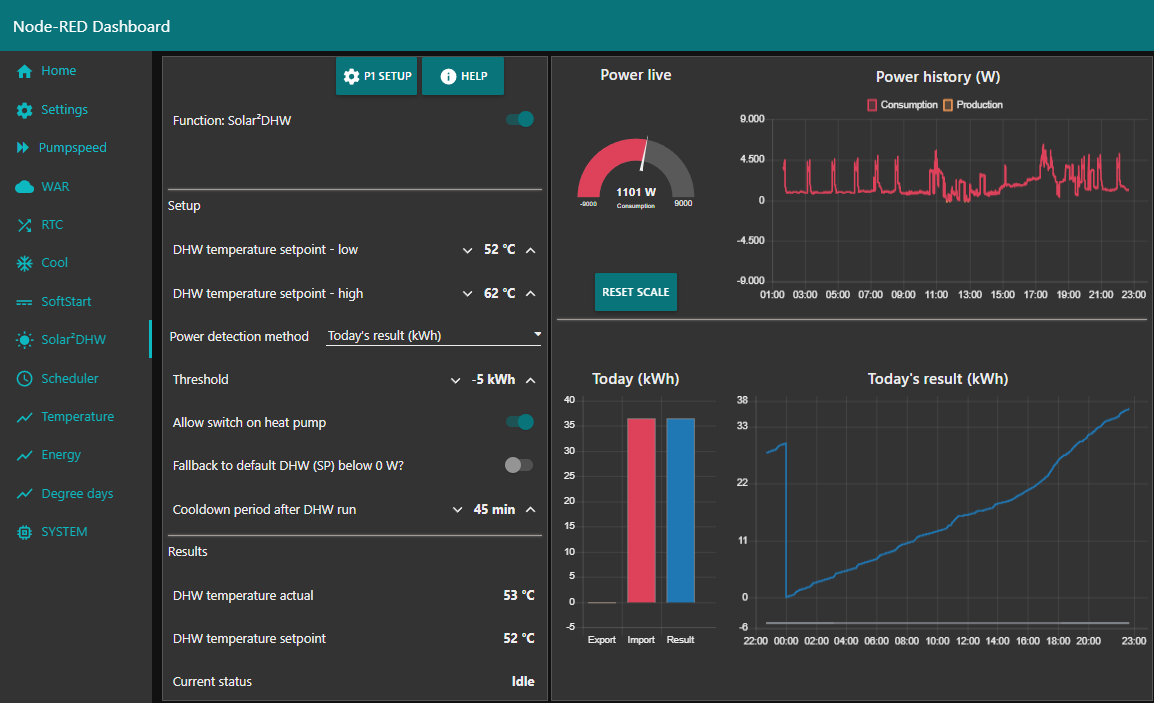
The aim of this function is to increase efficiency (and save cost) by utilizing solar energy as much as possible.
When there is solar energy in abundance, you can tell the heat pump to use that energy to heat up your DHW water tank.
To determine if there is enough solar energy, you need any form of power measurement. This can be a P1 power meter, or a meter directly behind your panels.
Important
For this function to work, you require a correctly setup P1 meter connected with this flow. See P1 instructions

You can enable/disable a schedule, multiselect a day of the week, specify the time (hour + minute) and give the schedule a name.
I have added an option to create 10x schedules for the following actions:
- Toggle heat pump power on / off
- Set water setpoint (heat shift / heat direct)
- Set room setpoint (RTC function)
- Start Force DHW runs
- Start Sterilization runs
- Set Quiet modes
- Set operating modes
- Toggle a custom function on / off
On each line of the scheduler, you can indicate if the heat pump should be powered on for the task or not.
A recent addition to the scheduler is the possibility to add conditions for each of the scheduled tasks.
Note
Make sure the native Panasonic scheduler (in the controller) is disabled to prevent unexpected behavior of the flow.
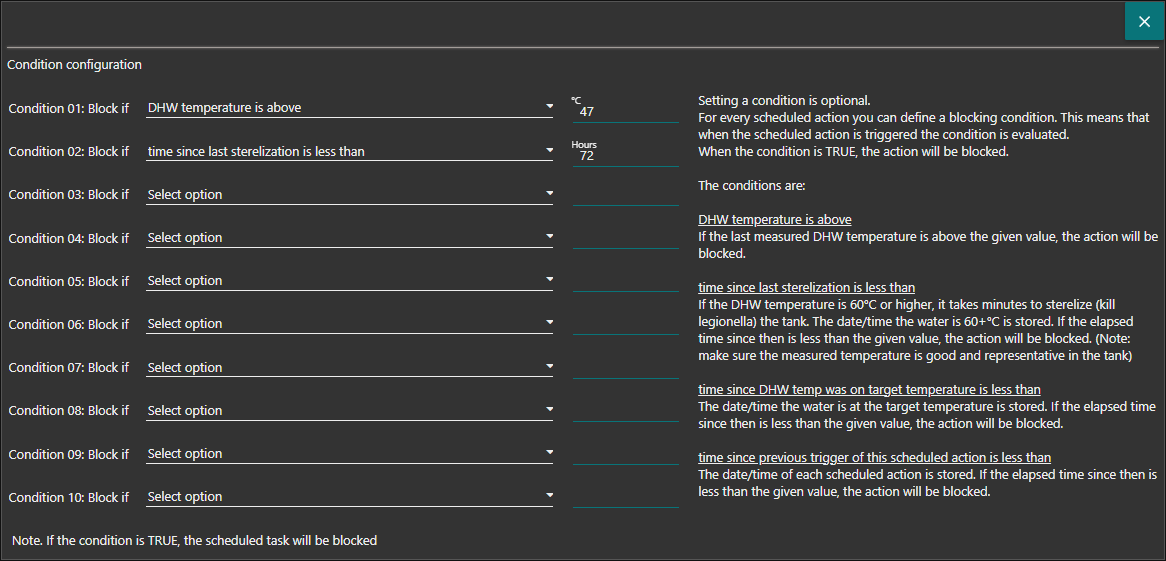
Each line in the condition section is a blocking condition. If the condition is met, the scheduled task will be blocked.
The measurements and values you can use as a condition are:
- DHW temperature is above ...
- time since last sterilization is less than ...
- time since last DHW temp was on target temperature is less than ...
- time since previous trigger of this scheduled action is less than ...
- Outside temperature is higher than ...
- Outside temperature is lower than ...
- Inside temperature is higher than ...
- Inside temperature is lower than ...