Hi, everyone! I'm following the steps from the Getting Started file.and using ubuntu 16.04 full OS (considering ubuntu 14.04 support until 2019) and a Bluetooth 4.0 adapter(GBU 521).
I'm having a strange trouble with flashing the drone. When I do DroneConnect.sh I get this as a result
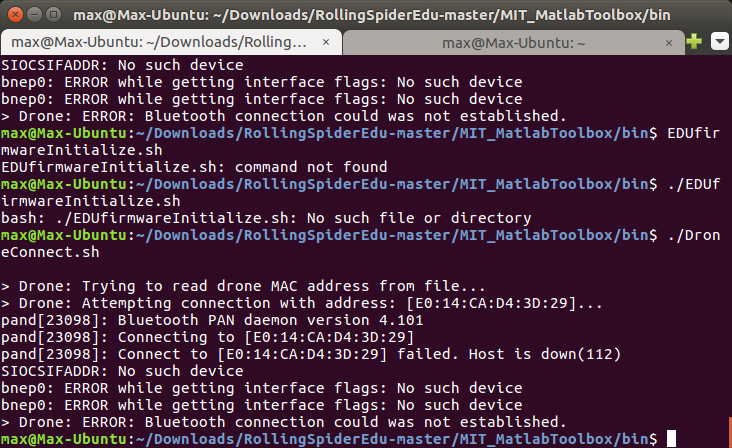
when I go into the Device Search of bluetooth, their has two bluetooth device option with the same name 'RS_B033503'
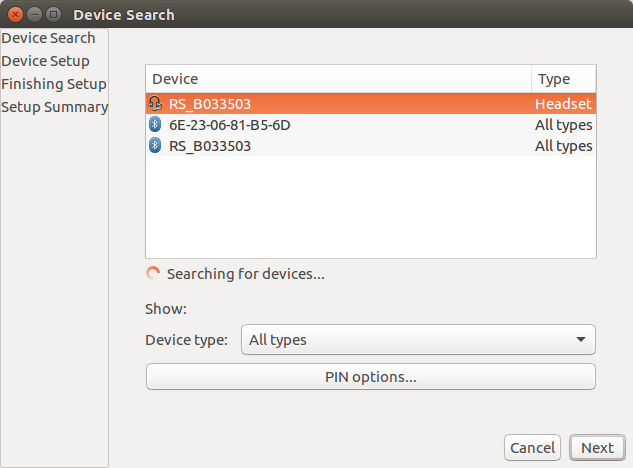
BUT also with different MAC address
"E0:14:CA:D4:3D:29" ,"A0:14:3D:29:CA:D4"
I had already tried methods as below
- Changing MAC to those two MAC address
- try to Install lots of different bluetooth driver or packages
- Redo everything from the first step by the Getting Started file for THREE times
STILL got the same error like the first picture...
I'm already stuck right here at lest for week, Can anybody now how to solved this problem? Really need Help!
Is it possible just because I build on ubuntu 16.04?
Hi, everyone! I'm following the steps from the Getting Started file.and using ubuntu 16.04 full OS (considering ubuntu 14.04 support until 2019) and a Bluetooth 4.0 adapter(GBU 521).
I'm having a strange trouble with flashing the drone. When I do DroneConnect.sh I get this as a result
when I go into the Device Search of bluetooth, their has two bluetooth device option with the same name 'RS_B033503'
BUT also with different MAC address
"E0:14:CA:D4:3D:29" ,"A0:14:3D:29:CA:D4"
I had already tried methods as below
STILL got the same error like the first picture...
I'm already stuck right here at lest for week, Can anybody now how to solved this problem? Really need Help!
Is it possible just because I build on ubuntu 16.04?