
Open-source AI gateway control plane with visual router pipelines, provider management, prompts, evals, MCP tools, virtual keys, teams, SSO groups, analytics, and observability.
Build, operate, and observe production AI gateways from one modern Vue and TypeScript workspace.


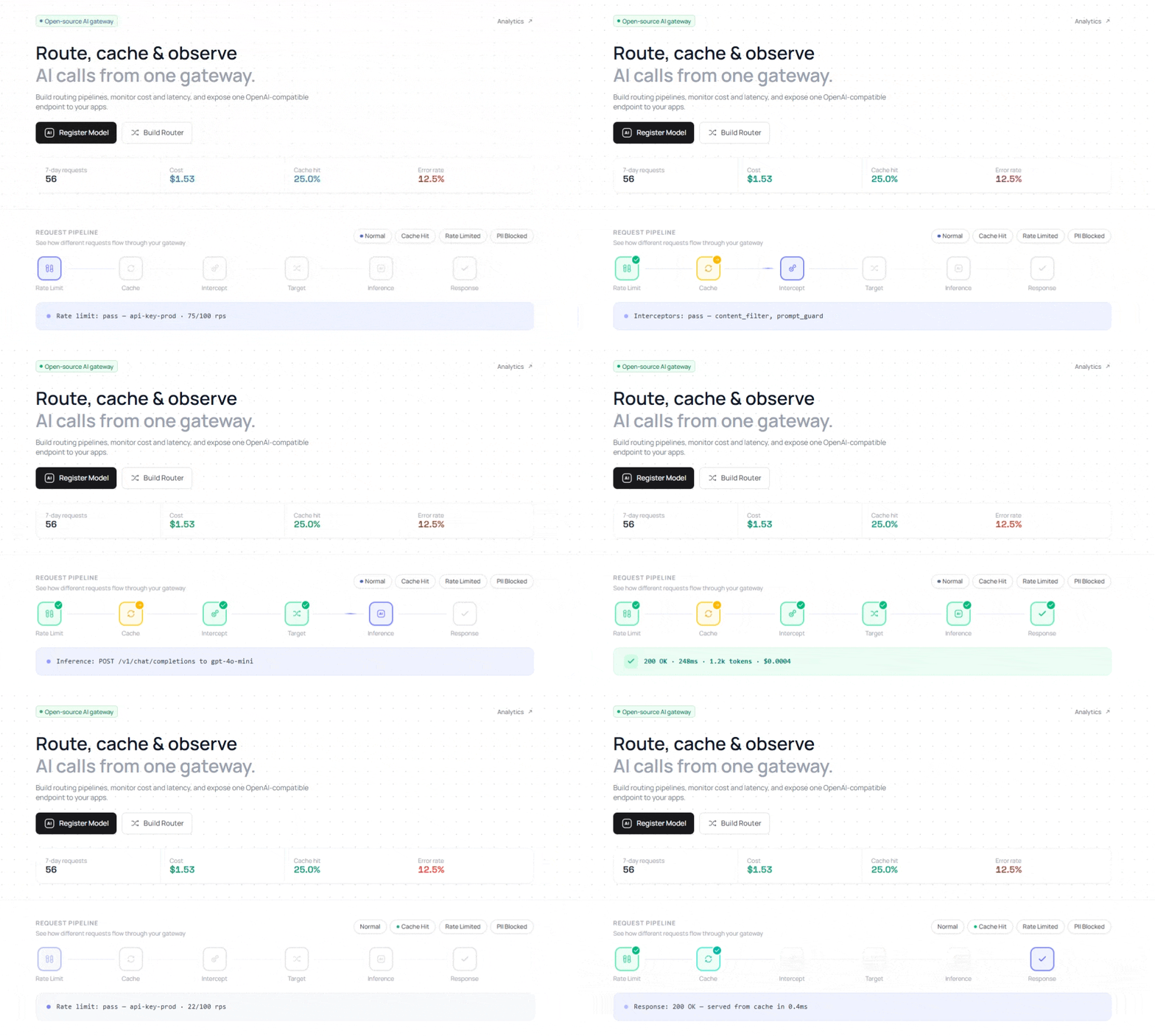
Hyperstrate Client is the web interface for Hyperstrate Server. It is a single-page application for teams running AI traffic in production: routing, policy, safety, cost controls, observability, prompt management, and team governance all live in one workspace.
Use it to:
- Design router pipelines visually, with features and interceptors shown in context.
- Register and operate model providers with health checks and key rotation.
- Inspect inference logs, costs, latency, cache performance, and agent sessions.
- Manage prompts, versions, evaluations, MCP servers, API keys, virtual keys, teams, and SSO groups.
| Area | What You Get |
|---|---|
| Router builder | Visual Vue Flow pipeline, targets, features, interceptors, linting, import/export, test inference |
| Pipeline features | Caching, retry, fallback, rate limits, budgets, MCP tools, semantic memory, quality gates, rollout controls |
| Safety interceptors | Content filters, PII detection, prompt guard, prompt shield, semantic routing, A/B testing, team budgets |
| Analytics | Request volume, tokens, spend, errors, latency percentiles, cache hit rates, provider health, audit logs |
| Playground | Compare up to 4 models side by side or trace a prompt through a router |
| Prompt management | Template variables, version history, restore flow, router attachment |
| Access control | API keys, virtual keys, teams, org users, spend caps, SSO group mapping |
| MCP | Register org-scoped Model Context Protocol servers for use inside router pipelines |
Legend: ✓ = built in, x = not the product's focus, PartialN = possible, but with an important caveat below.
| UI Capability | LiteLLM Dashboards | Portkey / Helicone | Langfuse / LangSmith | OpenRouter Console | Internal Admin Panels | Hyperstrate Client |
|---|---|---|---|---|---|---|
| Visual graph router builder | Partial1 | Partial2 | x | x | Partial3 | ✓ |
| Configure targets, features, and interceptors together | Partial4 | Partial5 | x | x | Partial3 | ✓ |
| Manage provider models and key rotation | Partial6 | Partial7 | x | x | Partial3 | ✓ |
| Test a router and inspect each routing step | Partial8 | Partial9 | Partial10 | Partial11 | Partial3 | ✓ |
| Manage teams, API keys, virtual keys, and budgets | ✓ | ✓ | Partial12 | Partial13 | Partial3 | ✓ |
| Prompt editor with versions and restore | Partial14 | Partial15 | ✓ | x | Partial3 | ✓ |
| Eval sets and router regression runs | x | Partial16 | ✓ | x | Partial3 | ✓ |
| MCP server management for gateway tools | x | x | x | x | Partial3 | ✓ |
| Agent-session analytics and replay | x | Partial17 | ✓ | x | Partial3 | ✓ |
| UI paired with a self-hosted gateway database | ✓ | Partial18 | Partial19 | x | ✓ | ✓ |
Notes:
| Note | Comment |
|---|---|
| 1 | LiteLLM dashboards are useful for proxy operations, keys, models, and spend, but router composition is still mostly config-driven. |
| 2 | Portkey and Helicone expose gateway configuration, but the workflow is not primarily a graph builder for self-hosted router pipelines. |
| 3 | Internal admin panels can do anything you build, but every capability here becomes your own design, implementation, maintenance, and security work. |
| 4 | LiteLLM handles models, routing, keys, budgets, and callbacks, but Hyperstrate groups targets, features, and interceptors as explicit router-building blocks. |
| 5 | Managed gateways support routing and guardrails, but the exact shape depends on product mode and plan. |
| 6 | LiteLLM supports model and key management, but key rotation UX and provider operations depend on proxy/database configuration. |
| 7 | Managed products support provider configuration, but credentials may live in the hosted control plane unless you use BYOK or self-hosted options. |
| 8 | LiteLLM can log proxy behavior, but step-by-step route explanation depends on callbacks and observability setup. |
| 9 | Managed gateways can explain request behavior well, but traces usually live in their hosted product. |
| 10 | Langfuse and LangSmith trace application runs; they do not own the gateway router unless you wire that data in. |
| 11 | OpenRouter shows model/provider behavior, but not your internal router pipeline or team policy decisions. |
| 12 | Langfuse and LangSmith have workspace/project controls, but not gateway-native virtual keys and spend enforcement by default. |
| 13 | OpenRouter has account/key controls, but not the same as tenant teams, internal virtual keys, and per-router budgets. |
| 14 | LiteLLM can integrate with prompt/observability tooling, but prompt editing is not the dashboard's main job. |
| 15 | Portkey and Helicone include prompt-management or prompt-adjacent workflows depending on product and plan. |
| 16 | Managed products can support eval-like or testing workflows, but router regression runs are not always first-class. |
| 17 | Managed observability products can support sessions or traces, but agent replay depth varies by product. |
| 18 | Helicone has open-source/self-hosting options; Portkey's common workflow is hosted or managed. Deployment model depends on product tier and edition. |
| 19 | Langfuse can be self-hosted; LangSmith deployment depends on plan. They are observability/eval systems, not the gateway database by default. |
- Build routers with weighted, percentage, priority, or policy-driven targets.
- Add 25+ pipeline stages across context, caching, resilience, traffic, cost, quality, intelligence, and rollout.
- Configure pre-routing interceptors for classification, safety, traffic governance, and experimentation.
- Run live test inference and inspect every phase of the pipeline trace.
- Review logs, stored payloads, A/B variants, feedback, webhooks, and evaluation runs per router.
- Track cost, tokens, request volume, error rate, and latency over time.
- Compare models, routers, virtual keys, providers, and cache behavior.
- Replay agent sessions with tool calls, quality scores, cost, turns, and loop detection.
- Export inference logs and inspect full request detail from the UI.
- Register provider models from a catalog of 100+ definitions across 13 providers.
- Configure API keys, custom base URLs, key pools, and rotation grace periods.
- Create prompt templates with
{{variable}}placeholders. - Browse prompt version history, preview snapshots, and restore earlier versions.
- Node.js 22+
- npm 10+
- A running Hyperstrate Server, usually at
http://localhost:8090
git clone https://github.com/Hyperstrate/client.git
cd client

cp .env.dist .env.local
npm install
npm run dev
The app starts at http://localhost:8080.
Configure the API endpoint in .env.local:
VITE_HYPERSTRATE_API_URL=http://localhost:8090
VITE_HYPERSTRATE_OPENAPI_URL=http://localhost:8090/swagger/doc.json
VITE_SUPABASE_URL=
VITE_SUPABASE_PUBLISHABLE_KEY=npm run dev # Vite dev server
npm run type-check # vue-tsc project check
npm run lint # ESLint 9
npm run format # Prettier for src/
npm run test:unit # Vitest
npm run test:e2e # Cypress headless
npm run story:dev # Histoire at http://localhost:6006
npm run codegen # regenerate the OpenAPI clientWhen the server OpenAPI spec changes, run:
npm run codegenBy default, code generation reads from ../server/docs/swagger.json and patches the generated client with scripts/patch-openapi-client.mjs.
| Layer | Technology |
|---|---|
| App framework | Vue 3 + TypeScript |
| Build system | Vite |
| Styling | Tailwind CSS 4 |
| Routing | Vue Router |
| State and components | vue-facing-decorator, vuex-facing-decorator, class-style Vue components |
| Headless primitives | Reka UI |
| Diagrams | Vue Flow |
| Charts | D3 |
| Auth client | Supabase SDK |
| Testing | Vitest, Cypress |
| Component docs | Histoire |
| API client | OpenAPI-generated TypeScript client |
src/
  features/
    app-auth/          login, setup, teams, virtual keys, SSO groups
    app-home/          home dashboard
    app-model/         model registry and provider configuration
    app-router/        router builder, pipeline diagram, router tabs
    app-playground/    model comparison and router inspection
    app-chat/          streaming chat interface
    app-mcp/           MCP server management
    app-prompt/        prompt editor and version history
    app-analytics/     analytics dashboards and logs
    agents/            agent session management
    domain-ui/         domain-specific reusable components
    ui/                shared design-system primitives
    core/              app shell, routing, DI container, store setup
  __generated__/
    hyperstrate-api/   generated TypeScript API client
npm run buildStatic assets are emitted to dist/. Serve them from any static host or CDN. Since this is a client-side routed SPA, configure your web server to fall back to index.html.
Example Nginx config:
location / {
    root /var/www/hyperstrate;
    try_files $uri $uri/ /index.html;
}Contributions are welcome. Read CONTRIBUTING.md before opening a pull request.
For a smooth review:
- Keep pull requests focused.
- Add tests for behavior changes.
- Run
npm run type-check,npm run lint,npm run test:unit -- --run, andnpm run build-only. - Regenerate the API client after server OpenAPI changes.
- Open an issue first for large UI, routing, or design-system changes.
Please do not report security vulnerabilities in public issues. See SECURITY.md for the private disclosure process.
Hyperstrate Client is released under the MIT License.