There's a sample project in the proj.ios_mac directory.
How to integrate the AppsFlyer SDK into your Cocos2dx Apple project.
1. Download the source files and copy them to your project
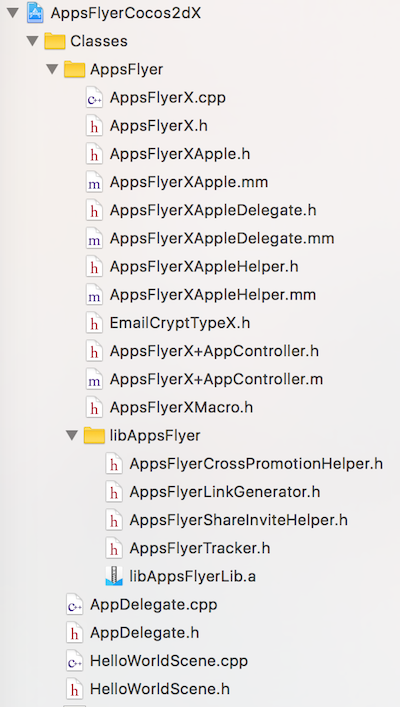
AppsFlyerX.cppAppsFlyerX.hAppsFlyerX+AppController.hAppsFlyerX+AppController.mAppsFlyerXApple.hAppsFlyerXApple.mmAppsFlyerXAppleDelegate.hAppsFlyerXAppleDelegate.mmAppsFlyerXAppleHelper.hAppsFlyerXAppleHelper.mmAppsFlyerXMacro.hEmailCryptTypeX.hlibAppsFlyer/AppsFlyerCrossPromotionHelper.hlibAppsFlyer/AppsFlyerLinkGenerator.hlibAppsFlyer/AppsFlyerShareInviteHelper.hlibAppsFlyer/AppsFlyerLib.hlibAppsFlyer/libAppsFlyerLib.a
to Classes/AppsFlyer
2. It looks like in the image below.
If you want to use AppsFlyer Strict mode SDK:
1. Download the source files from here and copy them to your project
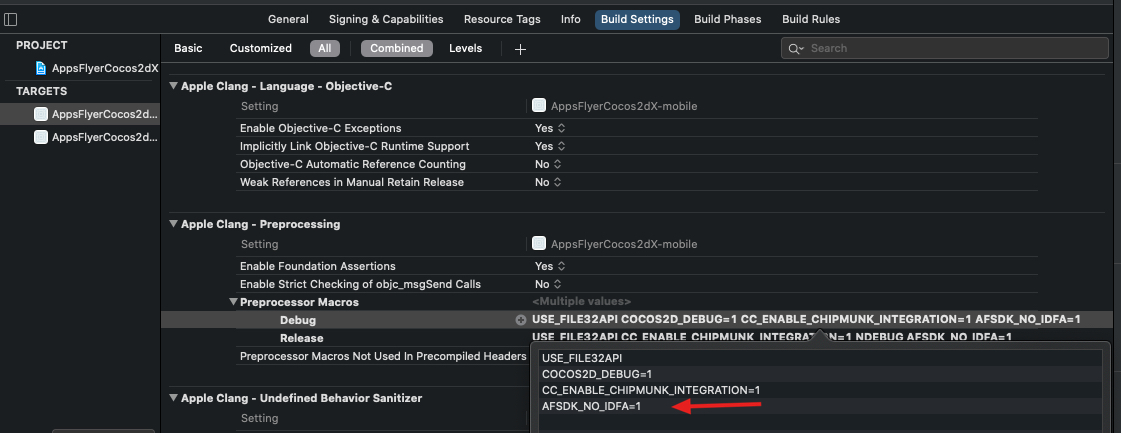
2. Inside Xcode, go to your target, then Build Settings and define the Preprocessor Macro AFSDK_NO_IDFA=1